Open plugin installation
From your Moodle site administration, choose the plugin installer.
Site administration
> Plugins
> Install plugins
Live classes inside your Moodle™ course. No separate video server to configure.
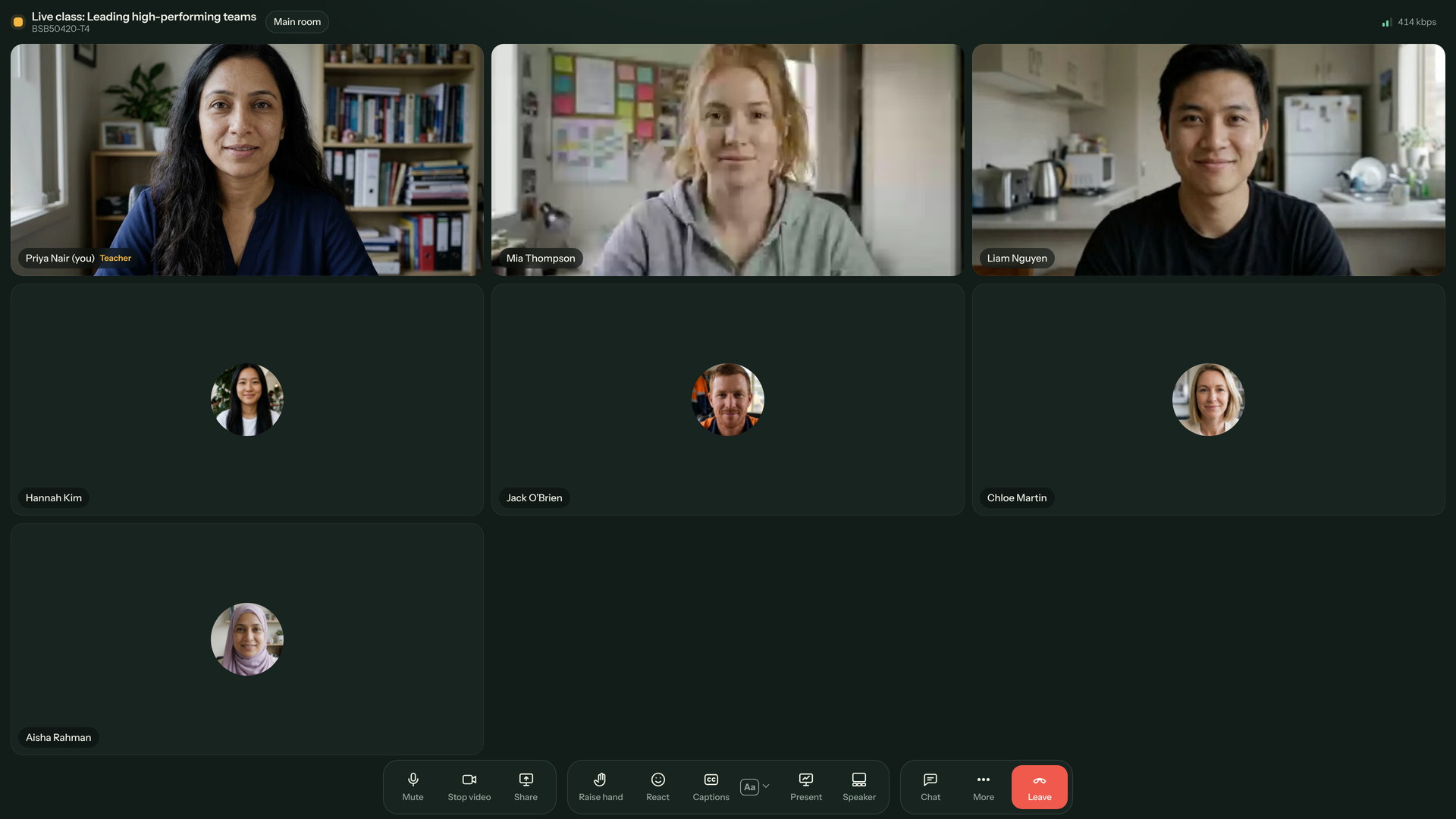
There is no separate video server to provision or configure. The activity lives inside your Moodle site.
When LMS Labs Central Config is connected, there are no settings to fill in. The activity settings page shows a green Central Config check.
From your Moodle site administration, choose the plugin installer.
Site administration
> Plugins
> Install pluginsChoose the classroom plugin package and follow Moodle's installation prompts.
With Central Config connected, see the green check. Add the activity to a course and teach.
Move naturally from a live explanation to learner questions, group work and a record of what happened.
Full HD trainer camera, HD learner cameras and Full HD screen sharing keep the teacher, the room and the material in view.
Use a whiteboard and share PowerPoint with transitions and animations, plus PDF, Word, Excel and image files.
Send learners into breakout rooms and keep teacher tools close by while you move between groups.
Polls, Q&A, chat, hand raise and reactions make space for quick checks, questions and quieter voices.
Show captions translated into each learner's language, with optional read-aloud so learners can listen too.
After class, an AI summary of speech, shared notes and slides is saved in Moodle.
Generate AI quizzes from the slides on screen in six types: multiple choice, true/false, matching, category sort, ordering and tap the cards. On the quiz wall, the teacher sees each learner's quiz and can stamp it with a tick, smiley, star, clap, 100 or heart.
Use background blur or images, one-click smooth skin and Studio quality cut-out. All are available before joining too.
Learners can edit their display name. Teachers can copy a guest link and share it with invited participants.
Keep recordings for 12 months. Attendance and hand raises count towards activity completion.
Follow the tutorial
Follow the same order as the full tutorial. Each chapter includes numbered screen guides and the point where it appears in the video.
Loading the visual guide…
AI Virtual Classroom: 5¢ per learner-hour. 1 LMS Labs credit (10 US cents) covers 2 learner-hours. Trainers are never counted, so don't include them. AI quizzes, recordings, captions and translation, and AI summaries are all included, along with read-aloud voice, breakout rooms, whiteboard and every other feature. No plans and no monthly fee, so holidays and quiet weeks cost nothing.
AI Virtual Classroom uses your LMS Labs credits, the same credits as all LMS Labs plugins. Credits are taken from your LMS Labs balance automatically as learners attend, and you can top up or turn on auto top-up at lms-labs.com.
AI quizzes are included, with or without voiceover. There is no separate question charge.
Don't count teachers: they are never charged
Large colleges and universities that would like to use AI Virtual Classroom but pay another way, such as an invoice, purchase order or annual agreement, just email us at support@lmshostingservices.com.
Review the package information and the current Moodle™ Marketplace listing.
AI Virtual Classroom works by itself. Where it asks for LMS Labs credentials, enter the Site ID and API key assigned to your Moodle site. See LMS Labs pricing and AI credits for current plans.
Using more than one LMS Labs plugin? These companions are free on LMS Labs:
Both are optional, free companion plugins and require no LMS Labs credit unlock. Any AI credits used by connected plugins remain separate metered usage.
Appears on your plugin page and in search results — name, icon, short description, screenshots.
Plugin name*
Icon*
Upload this PNG as the plugin icon. Minimum dimensions 200×200 px — this file is 1024×1024.
1024×1024 PNG, under 200 KB — comfortably above the 200×200 px minimum and under the 10 MB upload limit.
Short description*
Search cards show only the first 119 characters — the opening line has to sell on its own.
134/256 characters
Screenshots
Show meaningful features in use — the main UI, an important workflow, a finished report or dashboard. Must be at least 128 px wide and no more than 480 px wide. Avoid empty states, unreadable detail, and near-duplicate shots.
The main sales pitch on your plugin page — paste into the rich-text editor, then bold the headings.
Description*
Starts with the standalone-or-connected-suite setup, then gives the product pitch, requirements, external services and pricing.
2,878/7,000 characters
The complete listing page — the standalone/connected-suite setup appears first, followed by the product description. In the Marketplace description editor, switch to HTML source view (</> button) and paste it in one go. The Marketplace may strip style attributes, so the paste block uses semantic headings, paragraphs, lists, links, and one root element; confirm the saved listing after submission.
Preview
Use this plugin on its own — or make the whole suite simpler
This plugin works by itself. Where it asks for LMS Labs credentials, enter the Site ID and API key assigned to your Moodle site. See LMS Labs pricing and AI credits for current plans.
Highly recommended when you use more than one LMS Labs plugin:
Both companion plugins are optional. You can keep using this plugin on its own and retain its own settings where available. Full help: AI Virtual Classroom documentation.
AI Virtual Classroom
Live classes inside Moodle™ with translated captions, class summaries, breakout rooms, marked student boards and learner-time pricing.
Activity module · v2.5.3 · Moodle™ 4.5 to 5.3; tested on Moodle 4.5, 5.2 and 5.3. · Usage-priced — learner time
Live classes inside Moodle™ with translated captions, class summaries, breakout rooms, marked student boards and learner-time pricing.
Features
Requirements
Installation
Download the ZIP from lms-labs.com, then upload via Site administration → Plugins → Install plugins. Full step-by-step installation guide at https://lms-labs.com/docs/ai-virtual-classroom.
Documentation
Full documentation including screenshots, configuration reference, FAQ, and changelog:
https://lms-labs.com/docs/ai-virtual-classroom
External Services
AI Virtual Classroom connects to LMS Labs for shared-credit entitlement, learner-time usage and optional AI quiz generation. Quiz requests contain the teacher-provided slide or PDF text, requested question types and language; optional voice mode returns synthesized question audio. Live audio and video use Cloudflare Realtime. The plugin does not require customer-owned AI keys. Review lms-labs.com/privacy and lms-labs.com/terms for applicable data handling details.
Pricing
There is no one-time plugin charge. Learner time is billed at 1 LMS Labs credit (US$0.10) per 2 learner-hours: 5¢ per learner-hour. Trainers are never counted. AI quizzes, recordings, captions and translation, and AI summaries are all included. Thirty learners for an hour = 15 credits (US$1.50).
Support
Licence
This plugin is released under the GNU General Public Licence v3 or later.
Links that help customers find help, report issues, and get the most from the plugin.
Issue/bug tracker URL*
Documentation
Website
Discussion
Privacy information
What data (if any) leaves the customer's Moodle site — Moodle requires external services disclosed before purchase.
Use the canonical one-time acquisition price or free status shown below. AI usage credits, where applicable, remain separate metered usage.
Price name*
Amount (USD)*
Billing type*
Price description
Shown on the pricing card — what the customer gets, stated plainly.
Terms of Sale URL*
Appears on your plugin page — must be consistent with the price description.
Optional. Turn on 'Enable invoice-based purchasing' only if you want to issue and manage invoices through Stripe Connect — otherwise leave it off.
Add new version → upload the ZIP. The main download link always points to your latest version.
Release manifest is loading.
Release version
Maturity
Repository branch
The branch in the source repository that holds this release's code. All our plugin repos publish releases to main.
Repository tag
The git tag pinning this exact release — the release pipeline creates it automatically on every publish.
Supported Moodle versions
Raw compatibility statement: Moodle™ 4.5 to 5.3; tested on Moodle 4.5, 5.2 and 5.3.. version.php uses the standard 10-digit Moodle format YYYYMMDDXX (e.g. 2026081400). The Marketplace reads the version from version.php inside the uploaded ZIP.
Version notes (latest changelog)
Who maintains the plugin. Only the lead maintainer can publish.
Lead maintainer
The lead maintainer edits the plugin page, uploads versions, and manages contributors. Add teammates as Maintainer (can edit and upload versions) or Contributor (credited on the page only).
Component (frankenstyle)
Must match version.php $plugin->component and the ZIP root folder.
Plugin type
Install directory
Licence
Source control URL
Support email
Tags
Complete field set as JSON — an automated browser agent can read this block directly to populate the Marketplace edit screens.
{
"pluginName": "AI Virtual Classroom",
"frankenstyle": "mod_aivirtualclassroom",
"pluginTypePrefix": "mod",
"pluginTypeLabel": "Activity module",
"installDirectory": "/mod/aivirtualclassroom/",
"shortDescription": "Live classes inside Moodle™ with translated captions, class summaries, breakout rooms, marked student boards and learner-time pricing.",
"fullDescription": "Standalone or connected setup\n\nThis plugin works by itself. If it asks for LMS Labs credentials, enter your site's Site ID and API key; see https://lms-labs.com/pricing.\n\nUsing several plugins? Install the free AI Grader Central Config plugin to enter credentials once for compatible plugins, and the free AI Dashboard Quick Links block for one dashboard with settings, docs and updates.\n\nLive classes inside Moodle™ with translated captions, class summaries, breakout rooms, marked student boards and learner-time pricing.\n\n## Features\n\n- Live classes inside Moodle™ with translated captions, class summaries, breakout rooms, marked student boards and learner-time pricing\n\n## Requirements\n\n- Moodle 4.5 to 5.3; tested on Moodle 4.5, 5.2 and 5.3.\n- LMS Labs account and shared credits for learner-time usage\n- No customer-owned AI key or one-time plugin purchase\n- LMS Labs AI credits — purchase at [lms-labs.com](https://lms-labs.com)\n- Credit cost: 1 credit per 2 learner-hours (5¢ per learner-hour); AI quizzes and voiceover included.\n\n## Installation\n\nDownload the ZIP from [lms-labs.com](https://lms-labs.com), then upload via **Site administration → Plugins → Install plugins**. Full step-by-step installation guide at [https://lms-labs.com/docs/ai-virtual-classroom](https://lms-labs.com/docs/ai-virtual-classroom).\n\n## Documentation\n\nFull documentation including screenshots, configuration reference, FAQ, and changelog:\n\n**[https://lms-labs.com/docs/ai-virtual-classroom](https://lms-labs.com/docs/ai-virtual-classroom)**\n\n## External Services\n\nAI Virtual Classroom connects to LMS Labs for shared-credit entitlement, learner-time usage and optional AI quiz generation. Quiz requests contain the teacher-provided slide or PDF text, requested question types and language; optional voice mode returns synthesized question audio. Live audio and video use Cloudflare Realtime. The plugin does not require customer-owned AI keys. Review https://lms-labs.com/privacy and https://lms-labs.com/terms for applicable data handling details.\n\n## Pricing\n\nThere is no one-time plugin charge. Learner time is billed at 1 LMS Labs credit (US$0.10) per 2 learner-hours: 5¢ per learner-hour. Trainers are never counted. AI quizzes, recordings, captions and translation, and AI summaries are all included. Thirty learners for an hour = 15 credits (US$1.50).\n\n## Support\n\n- Documentation: [https://lms-labs.com/docs/ai-virtual-classroom](https://lms-labs.com/docs/ai-virtual-classroom)\n- Bug reports: [https://github.com/dari-learning/moodle-format_dari/tree/tmp-aivc-transfer/issues](https://github.com/dari-learning/moodle-format_dari/tree/tmp-aivc-transfer/issues)\n- Website: [lms-labs.com](https://lms-labs.com)\n- Email: support@lmshostingservices.com\n\n## Licence\n\nThis plugin is released under the [GNU General Public Licence v3](https://www.gnu.org/licenses/gpl-3.0.html) or later.",
"descriptionHtml": "<div><p><strong>AI Virtual Classroom</strong></p><p><em>Live classes inside Moodle™ with translated captions, class summaries, breakout rooms, marked student boards and learner-time pricing.</em></p><p>Activity module · v2.5.3 · Moodle™ 4.5 to 5.3; tested on Moodle 4.5, 5.2 and 5.3. · Usage-priced — learner time</p><p>Live classes inside Moodle™ with translated captions, class summaries, breakout rooms, marked student boards and learner-time pricing.</p><p><strong>Features</strong></p><ul><li>Live classes inside Moodle™ with translated captions, class summaries, breakout rooms, marked student boards and learner-time pricing</li></ul><p><strong>Requirements</strong></p><ul><li>Moodle 4.5 to 5.3; tested on Moodle 4.5, 5.2 and 5.3.</li><li>LMS Labs account and shared credits for learner-time usage</li><li>No customer-owned AI key or one-time plugin purchase</li><li><strong>LMS Labs AI credits</strong> — purchase at <a href=\"https://lms-labs.com\">lms-labs.com</a></li><li>Credit cost: 1 credit per 2 learner-hours (5¢ per learner-hour); AI quizzes and voiceover included.</li></ul><p><strong>Installation</strong></p><p>Download the ZIP from <a href=\"https://lms-labs.com\">lms-labs.com</a>, then upload via <strong>Site administration → Plugins → Install plugins</strong>. Full step-by-step installation guide at <a href=\"https://lms-labs.com/docs/ai-virtual-classroom\">https://lms-labs.com/docs/ai-virtual-classroom</a>.</p><p><strong>Documentation</strong></p><p>Full documentation including screenshots, configuration reference, FAQ, and changelog:</p><p><strong><a href=\"https://lms-labs.com/docs/ai-virtual-classroom\">https://lms-labs.com/docs/ai-virtual-classroom</a></strong></p><p><strong>External Services</strong></p><p>AI Virtual Classroom connects to LMS Labs for shared-credit entitlement, learner-time usage and optional AI quiz generation. Quiz requests contain the teacher-provided slide or PDF text, requested question types and language; optional voice mode returns synthesized question audio. Live audio and video use Cloudflare Realtime. The plugin does not require customer-owned AI keys. Review <a href=\"https://lms-labs.com/privacy\" target=\"_blank\" rel=\"noopener\">lms-labs.com/privacy</a> and <a href=\"https://lms-labs.com/terms\" target=\"_blank\" rel=\"noopener\">lms-labs.com/terms</a> for applicable data handling details.</p><p><strong>Pricing</strong></p><p>There is no one-time plugin charge. Learner time is billed at 1 LMS Labs credit (US$0.10) per 2 learner-hours: 5¢ per learner-hour. Trainers are never counted. AI quizzes, recordings, captions and translation, and AI summaries are all included. Thirty learners for an hour = 15 credits (US$1.50).</p><p><strong>Support</strong></p><ul><li>Documentation: <a href=\"https://lms-labs.com/docs/ai-virtual-classroom\">https://lms-labs.com/docs/ai-virtual-classroom</a></li><li>Bug reports: <a href=\"https://github.com/dari-learning/moodle-format_dari/tree/tmp-aivc-transfer/issues\">https://github.com/dari-learning/moodle-format_dari/tree/tmp-aivc-transfer/issues</a></li><li>Website: <a href=\"https://lms-labs.com\">lms-labs.com</a></li><li>Email: <a href=\"mailto:support@lmshostingservices.com\">support@lmshostingservices.com</a></li></ul><p><strong>Licence</strong></p><p>This plugin is released under the <a href=\"https://www.gnu.org/licenses/gpl-3.0.html\">GNU General Public Licence v3</a> or later.</p></div>",
"releaseVersion": "2.5.3",
"versionNumberNote": "version.php uses the standard 10-digit Moodle format YYYYMMDDXX (e.g. 2026081400). The Marketplace reads the version from version.php inside the uploaded ZIP.",
"maturity": "Stable",
"supportedMoodleVersions": [
"4.5",
"5.0",
"5.1",
"5.2",
"5.3"
],
"compatibleRaw": "Moodle™ 4.5 to 5.3; tested on Moodle 4.5, 5.2 and 5.3.",
"repositoryName": "moodle-mod_aivirtualclassroom",
"repositoryBranch": "main",
"repositoryTag": "v2.5.3",
"sourceControlUrl": "https://github.com/dari-learning/moodle-format_dari/tree/tmp-aivc-transfer",
"bugTrackerUrl": "https://github.com/dari-learning/moodle-format_dari/tree/tmp-aivc-transfer/issues",
"documentationUrl": "https://lms-labs.com/docs/ai-virtual-classroom",
"homepageUrl": "https://lms-labs.com/docs/ai-virtual-classroom",
"discussionUrl": "https://lms-labs.com/docs/ai-virtual-classroom?tab=discussion",
"zipDownloadUrl": "",
"license": "GNU GPL v3 or later",
"licenseUrl": "https://www.gnu.org/licenses/gpl-3.0.html",
"maintainer": "LMS Hosting Services (LMS Labs)",
"supportEmail": "support@lmshostingservices.com",
"tags": [
"activity",
"moodle",
"lms-labs"
],
"pricingModel": "Usage-priced — learner time",
"priceUsd": 0,
"marketplacePricingStatus": "priced",
"marketplacePricingReason": null,
"creditNote": "Learner time uses 1 LMS Labs credit per 2 learner-hours (5¢ per learner-hour). Trainers are never counted. AI quizzes, including voice, are included.",
"externalServices": "AI Virtual Classroom connects to LMS Labs for shared-credit entitlement, learner-time usage and optional AI quiz generation. Quiz requests contain the teacher-provided slide or PDF text, requested question types and language; optional voice mode returns synthesized question audio. Live audio and video use Cloudflare Realtime. The plugin does not require customer-owned AI keys. Review https://lms-labs.com/privacy and https://lms-labs.com/terms for applicable data handling details.",
"gettingStartedHtml": "<div>\n <p><strong>Use this plugin on its own — or make the whole suite simpler</strong></p>\n <p>This plugin works by itself. Where it asks for LMS Labs credentials, enter the Site ID and API key assigned to your Moodle site. See <a href=\"https://lms-labs.com/pricing\">LMS Labs pricing and AI credits</a> for current plans.</p>\n <p><strong>Highly recommended when you use more than one LMS Labs plugin:</strong></p>\n <ul>\n <li><strong><a href=\"https://lms-labs.com/docs/ai-central-config\">AI Grader Central Config</a> (free)</strong> — enter the Site ID and API key once. Compatible plugins can read the same values, so you do not need to enter them again in every plugin.</li>\n <li><strong><a href=\"https://lms-labs.com/docs/ai-dashboard-quick-links\">AI Dashboard Quick Links</a> (free)</strong> — one Moodle dashboard for installed plugins, settings, documentation, release checks and controlled updates.</li>\n </ul>\n <p>Both companion plugins are optional. You can keep using this plugin on its own and retain its own settings where available. Full help: <a href=\"https://lms-labs.com/docs/ai-virtual-classroom\">AI Virtual Classroom documentation</a>.</p>\n</div>",
"marketplacePageHtml": "<div><div><p><strong>Use this plugin on its own — or make the whole suite simpler</strong></p><p>This plugin works by itself. Where it asks for LMS Labs credentials, enter the Site ID and API key assigned to your Moodle site. See <a href=\"https://lms-labs.com/pricing\">LMS Labs pricing and AI credits</a> for current plans.</p><p><strong>Highly recommended when you use more than one LMS Labs plugin:</strong></p><ul><li><strong><a href=\"https://lms-labs.com/docs/ai-central-config\">AI Grader Central Config</a> (free)</strong> — enter the Site ID and API key once. Compatible plugins can read the same values, so you do not need to enter them again in every plugin.</li><li><strong><a href=\"https://lms-labs.com/docs/ai-dashboard-quick-links\">AI Dashboard Quick Links</a> (free)</strong> — one Moodle dashboard for installed plugins, settings, documentation, release checks and controlled updates.</li></ul><p>Both companion plugins are optional. You can keep using this plugin on its own and retain its own settings where available. Full help: <a href=\"https://lms-labs.com/docs/ai-virtual-classroom\">AI Virtual Classroom documentation</a>.</p></div><div><p><strong>AI Virtual Classroom</strong></p><p><em>Live classes inside Moodle™ with translated captions, class summaries, breakout rooms, marked student boards and learner-time pricing.</em></p><p>Activity module · v2.5.3 · Moodle™ 4.5 to 5.3; tested on Moodle 4.5, 5.2 and 5.3. · Usage-priced — learner time</p><p>Live classes inside Moodle™ with translated captions, class summaries, breakout rooms, marked student boards and learner-time pricing.</p><p><strong>Features</strong></p><ul><li>Live classes inside Moodle™ with translated captions, class summaries, breakout rooms, marked student boards and learner-time pricing</li></ul><p><strong>Requirements</strong></p><ul><li>Moodle 4.5 to 5.3; tested on Moodle 4.5, 5.2 and 5.3.</li><li>LMS Labs account and shared credits for learner-time usage</li><li>No customer-owned AI key or one-time plugin purchase</li><li><strong>LMS Labs AI credits</strong> — purchase at <a href=\"https://lms-labs.com\">lms-labs.com</a></li><li>Credit cost: 1 credit per 2 learner-hours (5¢ per learner-hour); AI quizzes and voiceover included.</li></ul><p><strong>Installation</strong></p><p>Download the ZIP from <a href=\"https://lms-labs.com\">lms-labs.com</a>, then upload via <strong>Site administration → Plugins → Install plugins</strong>. Full step-by-step installation guide at <a href=\"https://lms-labs.com/docs/ai-virtual-classroom\">https://lms-labs.com/docs/ai-virtual-classroom</a>.</p><p><strong>Documentation</strong></p><p>Full documentation including screenshots, configuration reference, FAQ, and changelog:</p><p><strong><a href=\"https://lms-labs.com/docs/ai-virtual-classroom\">https://lms-labs.com/docs/ai-virtual-classroom</a></strong></p><p><strong>External Services</strong></p><p>AI Virtual Classroom connects to LMS Labs for shared-credit entitlement, learner-time usage and optional AI quiz generation. Quiz requests contain the teacher-provided slide or PDF text, requested question types and language; optional voice mode returns synthesized question audio. Live audio and video use Cloudflare Realtime. The plugin does not require customer-owned AI keys. Review <a href=\"https://lms-labs.com/privacy\" target=\"_blank\" rel=\"noopener\">lms-labs.com/privacy</a> and <a href=\"https://lms-labs.com/terms\" target=\"_blank\" rel=\"noopener\">lms-labs.com/terms</a> for applicable data handling details.</p><p><strong>Pricing</strong></p><p>There is no one-time plugin charge. Learner time is billed at 1 LMS Labs credit (US$0.10) per 2 learner-hours: 5¢ per learner-hour. Trainers are never counted. AI quizzes, recordings, captions and translation, and AI summaries are all included. Thirty learners for an hour = 15 credits (US$1.50).</p><p><strong>Support</strong></p><ul><li>Documentation: <a href=\"https://lms-labs.com/docs/ai-virtual-classroom\">https://lms-labs.com/docs/ai-virtual-classroom</a></li><li>Bug reports: <a href=\"https://github.com/dari-learning/moodle-format_dari/tree/tmp-aivc-transfer/issues\">https://github.com/dari-learning/moodle-format_dari/tree/tmp-aivc-transfer/issues</a></li><li>Website: <a href=\"https://lms-labs.com\">lms-labs.com</a></li><li>Email: <a href=\"mailto:support@lmshostingservices.com\">support@lmshostingservices.com</a></li></ul><p><strong>Licence</strong></p><p>This plugin is released under the <a href=\"https://www.gnu.org/licenses/gpl-3.0.html\">GNU General Public Licence v3</a> or later.</p></div></div>",
"versionNotes": "Issues fixed\n\n- No user-facing fixes were documented for this release.",
"screenshotsNote": "Show meaningful features in use — the main UI, an important workflow, a finished report or dashboard. Must be at least 128 px wide and no more than 480 px wide. Avoid empty states, unreadable detail, and near-duplicate shots.",
"logoUrl": "/marketplace-logos/aivirtualclassroom.png",
"logoNote": "1024×1024 PNG, under 200 KB — comfortably above the 200×200 px minimum and under the 10 MB upload limit.",
"iconNote": "Upload this PNG as the plugin icon. Minimum dimensions 200×200 px — this file is 1024×1024.",
"websiteUrl": "https://lms-labs.com",
"priceName": "Usage-priced",
"priceDescription": "No one-time plugin charge. Learner time is 1 credit per 2 learner-hours (5¢ per learner-hour); AI quizzes, including voice, are included.",
"billingType": "Usage-based",
"termsOfSaleUrl": "https://lms-labs.com/terms",
"invoiceNote": "Optional. Turn on 'Enable invoice-based purchasing' only if you want to issue and manage invoices through Stripe Connect — otherwise leave it off.",
"leadMaintainer": "LMS Hosting Services (support@lmshostingservices.com) — Lead maintainer",
"contributorsNote": "The lead maintainer edits the plugin page, uploads versions, and manages contributors. Add teammates as Maintainer (can edit and upload versions) or Contributor (credited on the page only)."
}Installation, usage and privacy questions are best answered before learners enter the room.